
Common Plastic Shredder Faults and How to Troubleshoot Them

A shredder rarely fails without warning. The machine tells you something is wrong through current draw, noise, temperature and particle size long before a bearing seizes or a blade breaks. The operators who catch those signals early spend their maintenance budget on parts; the ones who don't spend it on rotors, gearboxes and unplanned shutdowns.
This guide covers the faults that actually show up in plastic recycling plants: what the symptom looks like, why it happens, and how to fix it in a defensible order. Some of the checks are five-minute jobs. Others mean the machine stays down until a part arrives. Knowing which is which before you start is most of the value.
One rule applies to everything below: isolate the machine before you open anything. Lockout/tagout, zero energy state, and no reach into a cutting chamber that can still move. Most shredder injuries happen during troubleshooting, not during production.
Before you open the machine: a triage order that saves hours
When a shredder misbehaves, most technicians start at the most expensive explanation. A better sequence runs from cheap and external to expensive and internal:
- Read the HMI fault log first. Modern PLC-controlled shredders record the last several trips with timestamps. A machine that tripped on motor overload four times in one shift is telling you about feed rate or blade condition, not about a defective contactor.
- Check what changed upstream. New material supplier, wetter feed, a different baling density, a conveyor that now runs faster. Roughly half of all "shredder faults" are feed faults wearing a shredder costume.
- Measure, don't guess. Running amperage against no-load amperage, bearing housing temperature with an infrared gun, particle size against the screen aperture. These three numbers resolve most disputes about whether output has actually dropped.
- Only then open the cutting chamber. Blade gap, knife edges, screen condition, rotor runout.
Skipping to step four is why some plants replace blade sets that were never the problem.
Fault 1: the shredder won't start
The machine is dead when you press start, or it hums and trips. Work the sequence from the outside in.
Safety circuit and interlocks
Access doors, hopper lids and discharge chutes carry limit switches or proximity sensors. Vibration drifts them out of alignment; dust obscures optical sensors; a door left slightly ajar after the last cleanout will hold the PLC in an unsafe state. Reset every emergency stop, confirm the guards are fully seated, and clean sensor lenses before assuming an electrical component has failed.
Thermal overload relay
If the previous shift worked the machine hard, the overload relay has likely tripped, and most units need a manual reset button pressed before restart. Resetting without finding the cause just buys you the same trip twenty minutes later. Look at what the machine was doing when it tripped.
Hard start: material wedged in the rotor
Industrial shredders are not designed to start under full load. A machine shut down while full of material can have blades wedged against a piece of scrap, and the motor cannot generate enough breakaway torque. Use the reverse function to back material out of the rotor before attempting a forward start. If your control system has no reverse, the chamber gets cleared by hand under LOTO.
Electrical supply
Verify three-phase voltage and check for a lost phase or reversed phase sequence. On granulator-style machines a reversed phase will typically trigger an alarm and refuse to start; a missing phase will let a motor hum and burn. Check fuses and confirm the motor contactor is actually pulling in — a click without rotation points at pitted or welded contacts, no click at all points at the coil or the PLC output.
Hydraulic drive machines
On hydraulic units the pump may be running while the drive stays in neutral: low fluid, blocked filters, or a solenoid valve stuck closed. Check level, filter condition and valve operation before touching the electrical cabinet.
The pattern worth remembering: when a shredder "won't start," the cause is the safety circuit or the overload about seven times out of ten, and the motor itself is rarely the culprit.
Fault 2: repeated jamming and blocking
Chronic blockage is almost always a feeding problem wearing a mechanical disguise. Before touching the rotor, check in this order:
- Feed rate. Operators under pressure to hit a daily tonnage overfeed, the chamber fills faster than the rotor can discharge, and motor protection trips. Running current should sit around 85% of rated; sustained operation above that is a jam waiting to happen.
- Discharge path. A blocked or undersized discharge conveyor backs material into the chamber. Clear the outlet before blaming the machine.
- Screen condition. A screen partially blinded by damp fines raises discharge resistance and pushes material into recirculation. Film and woven feed are the usual offenders.
- Moisture. Material above roughly 14% moisture content tends to smear and pack rather than cut, particularly in film and bag stock.
- Tramp metal and hard contamination. A bolt, a bearing race or a section of steel banding wedged between rotor and counter-knife will lock the machine solid.
If blockages persist after all five checks, the cutting system itself is the problem: knives too dull to bite, or a blade gap opened well beyond specification. A dull rotor knife does not slice the material, it pushes it, and the ram keeps forcing more in behind it.
Fault 3: throughput falls or output comes out oversized
This is the fault that quietly costs the most money, because the machine appears to run normally. Output is down, flakes are larger than the screen should allow, fines increase, and energy per tonne climbs.
Dull knives
Blade wear is the dominant cause. A worn edge tears rather than shears, so the material circulates inside the chamber longer, generating heat and fines while throughput drops. The objective trigger is current draw: a sustained rise of around 15% over the clean-knife baseline means the edge is gone, regardless of how the edge looks to the eye.
Blade gap drift
The gap between rotor knife and counter-knife sets both cut quality and load. Too wide and material folds over the knife instead of being sheared; too narrow and you get metal contact, heat and accelerated wear. Typical settings run 0.5–1.0 mm for rigid stock, 1.0–2.0 mm for hollow containers, 0.3–0.5 mm for film and woven material, and 0.3–0.8 mm for PVC and PC. Re-check after any knife change and after any hard impact.
Screen damage or wrong aperture
A torn screen passes oversized pieces straight through. A screen whose aperture is smaller than the process needs raises recirculation, and on tough material recirculation can consume 60–70% of the machine's work. Match the aperture to the downstream requirement, not to habit.
Uneven feeding
Surging feed alternately starves and overloads the rotor. A consistent feed — via ram, conveyor with variable speed, or a controlled hopper level — typically recovers more capacity than any hardware change.
| Symptom | Most likely cause | First action |
|---|---|---|
| Current draw up ~15%, output down | Dull rotor knives | Measure blades, schedule sharpening |
| Oversized pieces pass through | Torn screen or gap too wide | Inspect screen, reset gap to spec |
| Excess fines, more dust | Gap too tight or knives chipped | Re-set gap, inspect edges |
| Output varies with feed surges | Inconsistent feeding | Stabilise feed rate |
| Throughput collapses on film | Low bulk density, screen too fine | Increase aperture, consider pre-densifying |
Fault 4: excessive vibration or unusual noise
Every shredder vibrates. A sudden change in character or intensity is the signal that matters, and the correct response is to stop the machine, not to keep running and see if it settles.
- Knocking at rotor frequency — usually a loose, chipped or missing knife, or foreign material in the chamber.
- Metal-on-metal grinding or screeching — blade gap closed to zero, or a knife contacting the counter-knife or screen. Stop immediately.
- Steady vibration that grows with speed — rotor imbalance. Common causes are uneven knife sets (a group of knives with a weight spread over roughly 5 g), broken blades, or material build-up on the rotor.
- Rumbling from the bearing housings — bearing wear, often with heat. Check temperature at the same time.
- Periodic thump — a damaged belt, worn coupling, or a loose foundation bolt.
Rotor imbalance deserves specific attention. Replacing one knife in a set without weighing the group is the classic cause; so is running a rotor with material packed behind the knives. If vibration persists after blade service, have the rotor balance checked rather than continuing to run — imbalance destroys bearings and gearboxes, which are far more expensive than a rebalance.
Fault 5: bearings or gearbox running hot
Heat is the earliest and cheapest warning you will get on rotating assemblies. A single reading means little; a rising trend over weeks is the actual signal. Keep an infrared gun on the maintenance cart and log housing temperatures.
- Under-lubrication — the obvious cause. Use the specified grease, typically an NLGI 2 lithium grade, and respect the interval.
- Over-lubrication — equally common and less recognised. Overfilled housings churn the grease and generate heat. A bearing housing filled to roughly half its free volume is the usual target, not packed solid.
- Contaminated or degraded grease — wash out and recharge rather than topping up.
- Excessive belt tension — overloads the bearings on the driven shaft. Belts should be tensioned to spec, not "as tight as possible."
- Worn bearing or failed seal — replace; no adjustment will fix it.
- Poor ventilation around the motor — clean the cooling fins and fan cover, and confirm supply voltage is stable.
Fault 6: the hydraulic ram slows down or stops
Single-shaft shredders depend on the ram to push material into the rotor. When the ram loses force or stalls mid-cycle, throughput drops sharply and the machine begins to sound like it has a blade problem when it does not.
- Check oil level and look for aeration or foaming in the tank.
- Check filter condition and suction strainer — a blocked suction line starves the pump and mimics pump failure.
- Check oil temperature and cooling; hot oil loses viscosity and the ram loses force.
- Listen for relief valve operation — continuous relief means the pressure setting is being reached with no useful work done.
- Inspect the cylinder for seal leakage and the rod for scoring, and check for mechanical obstruction in the ram guide.
Do not raise the relief pressure to "get more force." Ram force is set by the design; increasing it to compensate for dull knives transfers the load onto the rotor, bearings and structure.
Fault 7: motor overheating and repeated trips
Motor heat is a symptom with several possible upstream causes, and treating the motor itself is usually the wrong response.
- Sustained overload from feed rate or dull blades — the most common cause.
- Low or unstable supply voltage, or a lost phase on a three-phase machine.
- Poor ventilation: dust-packed cooling fins, blocked fan cover, or an enclosure in a hot corner of the plant.
- Frequent direct-on-line starts against a loaded chamber — clear the chamber before restarting.
- Mechanical drag from over-tensioned belts or a failing bearing in the drive train.
If the motor trips on a healthy machine with sharp blades and moderate feed, check the electrical supply before replacing anything.
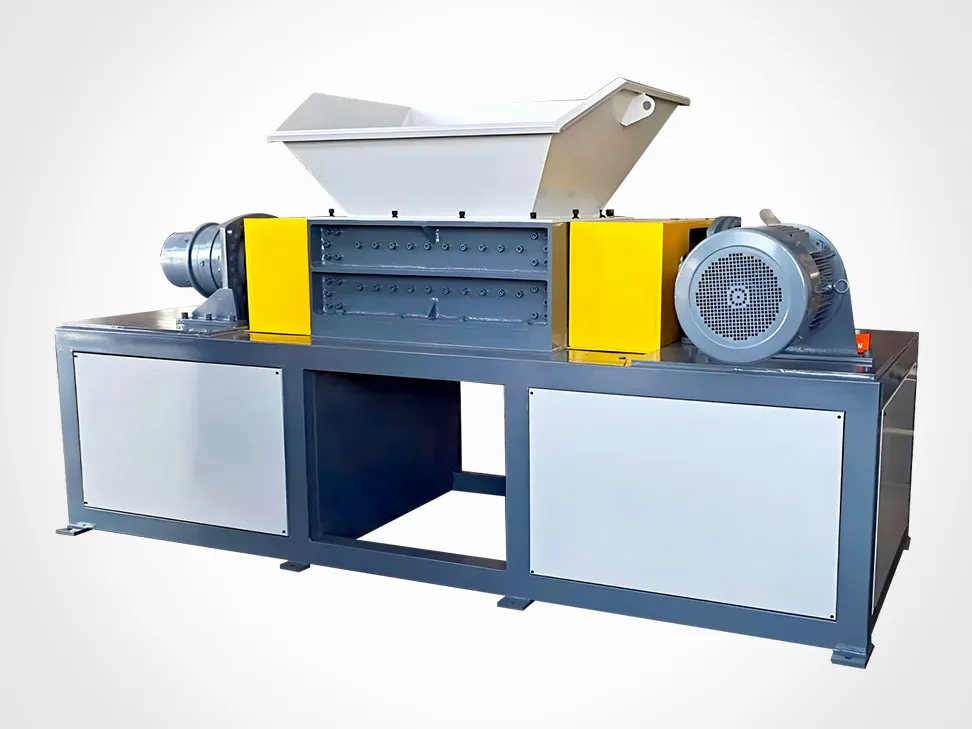
How shredder faults propagate into the crusher and the pulverizer
In a size-reduction line the shredder is the first stage, which means its faults do not stay in the shredder. They travel downstream and show up as problems in equipment that is not actually at fault — and that misdiagnosis is where a lot of maintenance budget disappears.
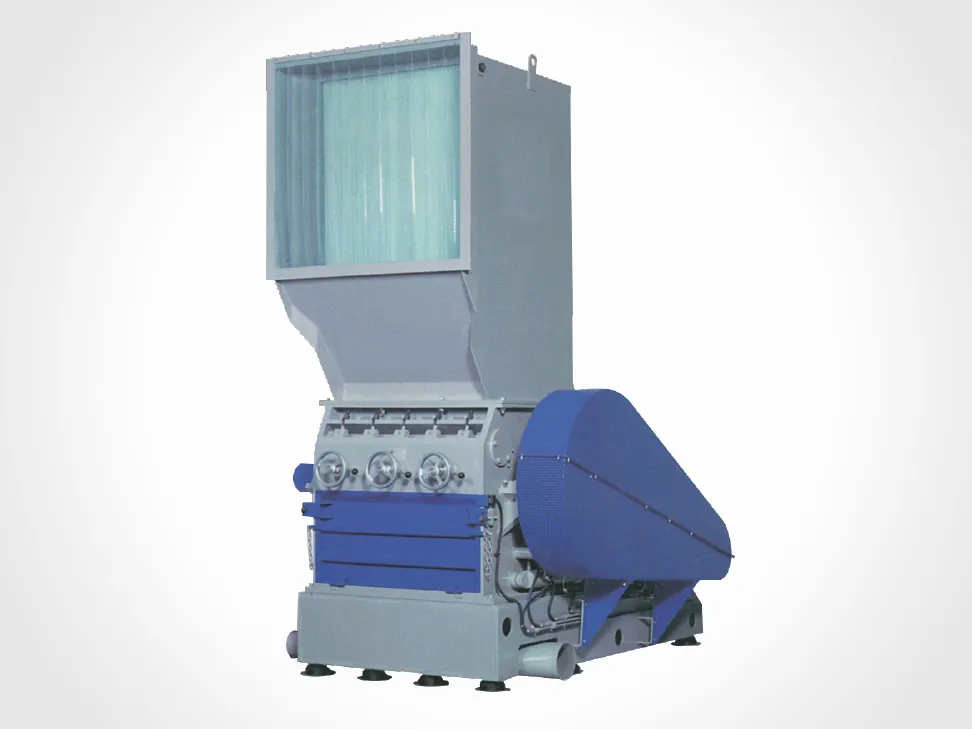
What the crusher sees
A granulator or heavy-duty crusher expects a consistent feed of 30–80 mm shredded pieces. When shredder knives go dull and the gap opens, output size distribution widens: oversized pieces that the crusher throat was not sized for, plus a higher fraction of fines. The crusher responds by drawing more current, generating more heat, and wearing its own knives faster. Plants that replace crusher knives every few months while never touching the shredder are usually treating a downstream symptom.
The reverse also happens. A crusher with worn knives or a deformed screen raises back-pressure into the shredder discharge, and the shredder begins to recirculate and overheat. When both machines show symptoms at once, check the interface — discharge path, screen condition, and whether the crusher's rated capacity still exceeds the shredder's actual output by the margin it was designed for.
What the pulverizer sees
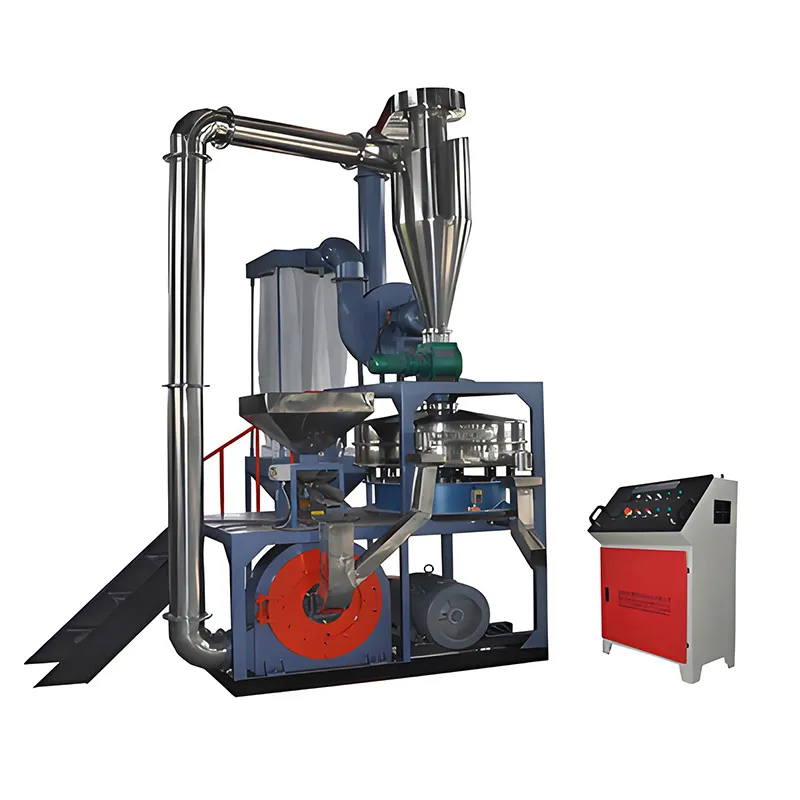
The pulverizer is the third stage and the least tolerant of upstream inconsistency. Disc clearance on a PVC or PE mill is set in fractions of a millimetre, and the mill is designed around a narrow feed window of clean, uniform 8–14 mm flake.
Feed it shredder output that carries oversized pieces, tramp metal or excessive fines and three things follow. Disc clearance is disturbed, so powder fineness drifts off specification. Metal contamination scores the disc faces, which is not a repairable fault. Fines that should have been discharged at the shredder or crusher stage pack inside the mill and raise the thermal load.
Heat is the specific risk with PVC. Above roughly 200 °C the polymer begins to degrade and release hydrogen chloride, and a pulverizer running hot produces off-spec powder while corroding downstream equipment and loading the dust extraction system. Cooling water flow, disc clearance and feed uniformity are the three variables that keep a mill out of that regime. When powder quality drops, the first question to ask is not what is wrong with the mill — it is what the shredder has been feeding it for the past two weeks.
A diagnostic rule worth adopting
When a downstream machine develops a fault, check the machine feeding it before servicing the machine that hurts. Rotor knives at 300–500 operating hours, crusher knives at 300–800 hours depending on material, and pulverizer disc clearance checked against feed quality rather than on a fixed calendar — that order reflects how faults actually move through a line.
Keep the parts that actually stop you
Most extended shutdowns are waiting-on-parts shutdowns. The inventory that prevents them is short:
- One full set of rotor knives and counter-knives, matched and weighed as a group.
- At least one spare screen in the aperture you run most, plus the next size up.
- Bearing set for the rotor shaft and the drive shaft.
- Drive belts, matched as a set.
- Contactor and overload relay of the ratings actually fitted.
- Hydraulic filter elements and the correct oil specification.
Everything else can usually be sourced within a normal lead time.
References
The fault categories, triage sequence and component checks in this article draw on published troubleshooting guidance from industrial equipment suppliers and service organisations, including Telford Smith's industrial shredder troubleshooting guide, ARZIR's shredder startup checklist, Shini's SG-23 series granulator service manual, and maintenance fault listings published by Wensui, Xucai and Baoyiyuan. Manufacturer service manuals for the specific machine in your plant take precedence over any general guidance.
Frequently asked questions
Why does my shredder trip on overload when the blades were sharpened recently?
Check feed rate and the discharge path before blaming the blades. A blocked discharge conveyor or a screen blinded with damp fines will trip the overload even with sharp knives. Also confirm the blade gap was actually re-set after the sharpening — a gap left too tight raises load immediately, and one left too wide makes the rotor push rather than cut.
How hot is too hot for a shredder bearing housing?
Track the trend rather than chasing a single number. A housing that normally sits at 50 °C and reads 70 °C this week is a developing fault even though 70 °C is not alarming in absolute terms. Anything accompanied by rumbling, or a reading climbing steadily across shifts, justifies stopping and inspecting before the bearing fails.
Is it safe to run the reverse function to clear a jam?
Yes on machines that offer it, and it is usually faster than manual clearing, but stay within the control system's designed reverse cycle. Repeated long reverse runs heat the motor and can work material further into the rotor. If three reverse cycles do not free it, isolate the machine and clear the chamber by hand.
Can I replace a single damaged knife instead of the full set?
Not on a rotor where knives are matched. Mixing a new knife into a worn set unbalances the rotor and changes the effective cutting circle, which shows up as vibration and uneven wear. Replace as a weighed group, keeping the spread within roughly 5 g across the set, and re-check the gap afterwards.
Why has my pulverizer powder fineness drifted when the mill discs look fine?
Look upstream. Disc clearance is only one variable; feed size distribution and contamination matter just as much. A shredder with a widened blade gap passes oversized pieces that reach the mill and disturb clearance under load, and metal that gets past the shredder scores the disc faces. Check shredder output size and contamination control before re-grinding or replacing discs.